

Share!
The expanding ‘Create to Earn’ world on Teravit.
A key feature of Teravit is that you can upload your own content and have it enjoyed by users all over the world!
Furthermore, by selling items and avatar data in your world and on the market, you can earn points that can be exchanged for in-game currency or cash!
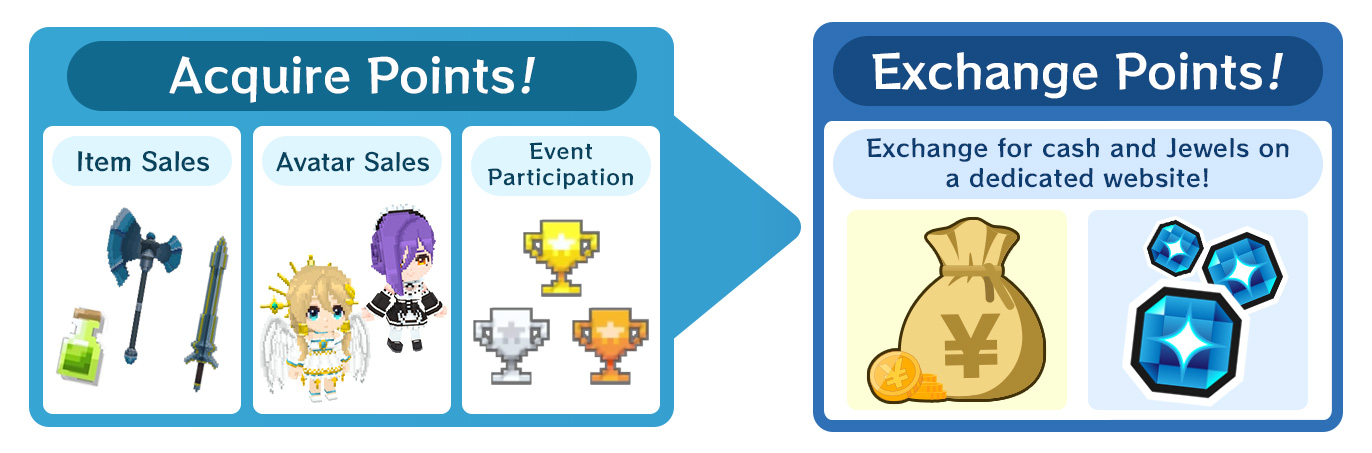
Create to Earn: Point allocation procedure
If “In-World Items” or “Avatars” made by creators are sold, points will be returned according to the Jewel price set by the creator.
Points can only be exchanged on the Creators’ website and the exchange rate is “10 points = 10 Jewels” or “10 points = 5 yen”.
The amount withheld from creators will be used to cover:
- Teravit’s development and operating costs (including server costs)
- Prizes and awards for World Creation Contest
- Player returns in various campaigns
We will use this to make Teravit more enjoyable for many players, including creators.
To Acquire Points
First, register as a creator!
When you register as a creator on the Creators’ website, you will be able to check your points earned from in-game sales and exchange them for Jewels or cash.
Anyone with a Teravit account can register as a creator, so once you start playing Teravit, be sure to register as a creator!
Click here to visit the Creators’ website.
Sell items in your world!
With Teravit, you can easily set up in-world item selling!
Please take a look at the procedure for setting up shopkeepers to sell items.
Upload your world!
Upload the worlds you have created with your name and description!
For more information on how to create a world, please see the contents of the“Create!”
section!
A lot of information has been compiled to help you create a great world.
Create and sell your avatar!
The external software MagicaVoxel can be used to create avatars exactly how you want.