

How To See The Home Screen
How to View the Home Screen
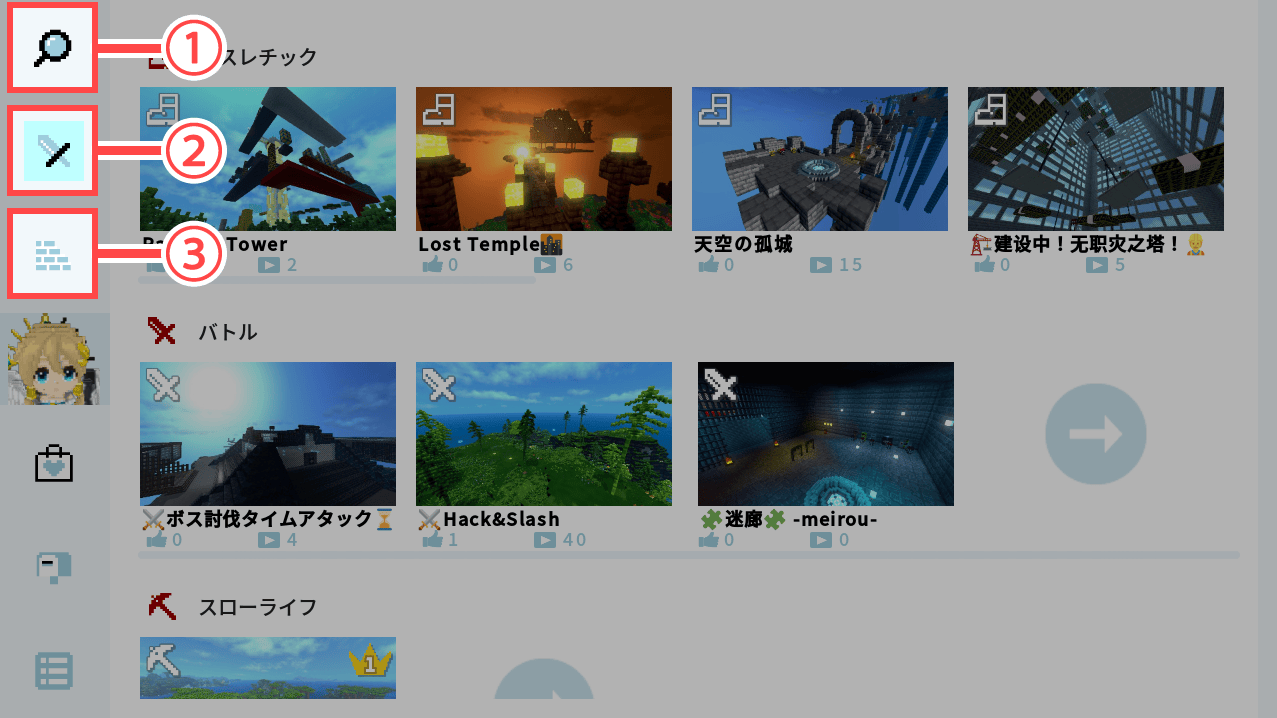
①Search
 |
Search for publicly uploaded Worlds |
 |
Search for rooms in worlds where the password is publicly available |
 |
A list of tags that can be attached to Worlds is displayed. You can search by clicking them. |
②World List
A list of Worlds that have been uploaded by officials and players.
Choose a World and press “Play Now” to play.
Click here for detailed gameplay instructions.
③World Creation
A list of Worlds you created.
Click “Create New World” to build your own.
Click here for detailed instructions on how to build a World.
How to View the Home Screen
①Search
|
Search for publicly uploaded Worlds |
|
Search for rooms in worlds where the password is publicly available |
|
A list of tags that can be attached to Worlds is displayed. You can search by clicking them. |
②World List
A list of Worlds that have been uploaded by officials and players.
Choose a World and press “Play Now” to play.
Click here for detailed gameplay instructions.
③World Creation
A list of Worlds you created.
Click “Create New World” to build your own.
Click here for detailed instructions on how to build a World.
How To View The Home Screen
①Search
|
Search for publicly uploaded Worlds |
|
Search for rooms in worlds where the password is publicly available |
|
A list of tags that can be attached to Worlds is displayed. You can search by clicking them. |
②World List
A list of Worlds that have been uploaded by officials and players.
Choose a World and press “Play Now” to play.
Click here for detailed gameplay instructions.
③World Creation
A list of Worlds you created.
Click “Create New World” to build your own.
Click here for detailed instructions on how to build a World.
How to View the Home Screen
①Search
|
Search for publicly uploaded Worlds |
|
Search for rooms in worlds where the password is publicly available |
|
A list of tags that can be attached to Worlds is displayed. You can search by clicking them. |
②World List
A list of Worlds that have been uploaded by officials and players.
Choose a World and press “Play Now” to play.
Click here for detailed gameplay instructions.
③World Creation
A list of Worlds you created.
Click “Create New World” to build your own.
Click here for detailed instructions on how to build a World.