
How To Use
Controls
Basic Controls
| Functions | Mouse/Keyboard |
| Move | W / A / S / D |
| Jump | Space key |
| Dash | Double Click W/A/S/D |
| Climb | While jumping, face the wall and press↑ key |
| Examine | F Key |
| Discard | Q key |
| Select Item | Mouse scroll |
| Use Item | Right click |
| Item Shortcut | 1~9,0 |
| Display Menu | Tab key |
| Cancel/Close | Esc key |
| Chat | T key |
| Screenshot | F10 key |
| Full Screen | F11 key |
In-Game Controls
| Functions | Mouse/Keyboard |
| Attack | Left Click |
| Equip Weapon | Right click |
| Change Weapon | E Key |
Build Mode Controls
| Functions | Mouse/Keyboard |
| Destroy Block (Builder Punch Selected) | Left Click |
| Switch to Flying Mode | Space key (during jump) |
| Ascend | Space key (during fly) |
| Fall | SHIFT key (during fly) |
| Change Cursor Mode | F Key |
| Toggle Equiped Tool | E Key |
| Display Shortcut | Ctrl key |
Controls When Riding Animals and Vehicles
| Functions | Mouse/Keyboard |
| Get On/Get Off | F Key | Move | W / A / S / D |
| Jump | Space key |
| Wheelie (When Riding a Bike) | SHIFT key |
| Drift (When Riding a Vehicle) | Hold downSpace keyand move left/right |
Controls
Basic Controls
| Functions | Mouse/Keyboard |
| Move | Left Stick |
| Jump | Y Button |
| Dash | Push in Left Stick |
| Climb | While jumping, face the wall and pressleft stick |
| Examine | B Button |
| Discard | Down Button |
| Select Item | LB / RB Button |
| Use Item | A Button |
| Item Shortcut | 【None】 |
| Display Menu | START Button |
| Cancel/Close | A Button |
| Chat | Up Button |
| Screenshot | 【None】 |
| Full Screen | 【None】 |
InGame Controls
| Functions | Mouse/Keyboard |
| Attack | X Button |
| Equip Weapon | A Button |
| Change Weapon | LT Button |
Build Mode Controls
| Functions | Mouse/Keyboard |
| Destroy Block (Builder Punch Selected) | X Button |
| Switch to Flying Mode | A Button (during jump) |
| Ascend | Y Button (during fly) |
| Fall | Push in right stick (during fly) |
| Change Cursor Mode | B Button |
| Toggle Equiped Tool | LT Button |
| Display Shortcut | 【None】 |
Controls When Riding Animals and Vehicles
| Functions | Mouse/Keyboard |
| Get On/Get Off | B Button |
| Move | Hold down RT Button while pushing Left Stick Go Back with LT Button |
| Jump | Y Button |
| Wheelie (When Riding a Bike) | Push Left Stick Down |
| Drift (When Riding a Vehicle) | Hold downY Button and move left/right |
How To Start The Game
Operation Methods
Basic Operations
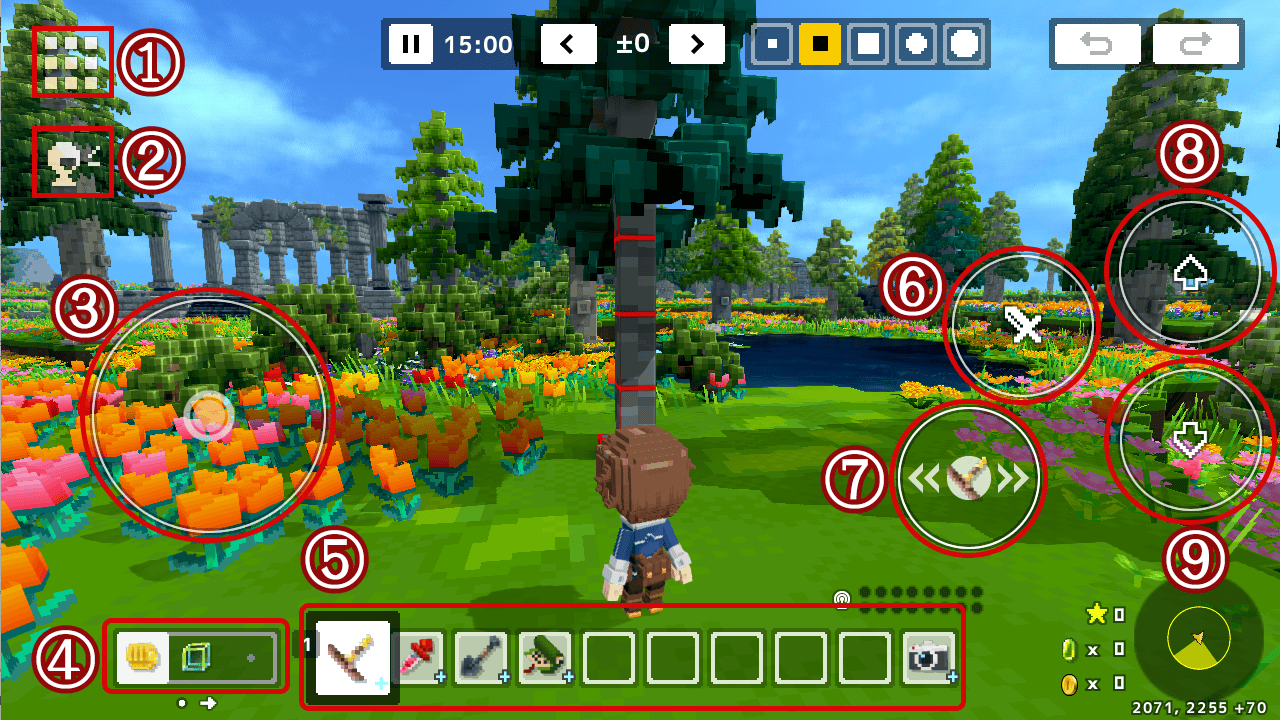
| Number | Explaination |
| ①: Menu Button |
Open the Menu screen. |
| ②: Chat Button |
Open the Chat screen. |
| ③: Move |
When moving forward the character will also move. |
| ④: Switch Equipment Tool |
Tapping will switch the equipped tool. |
| ⑤: Item List |
Select and use the set item. |
| ⑥: Using the Equipment Tool |
Use the equipped tool. |
| ⑦: Item Slider |
You can select items that have been placed in the item slots by sliding left or right. Tap to use them. |
| ⑧: Jump |
Tap to Jump. |
| ⑨: Descend |
During flight mode or when slightly underwater, player will descend. |
Controls During World Gameplay
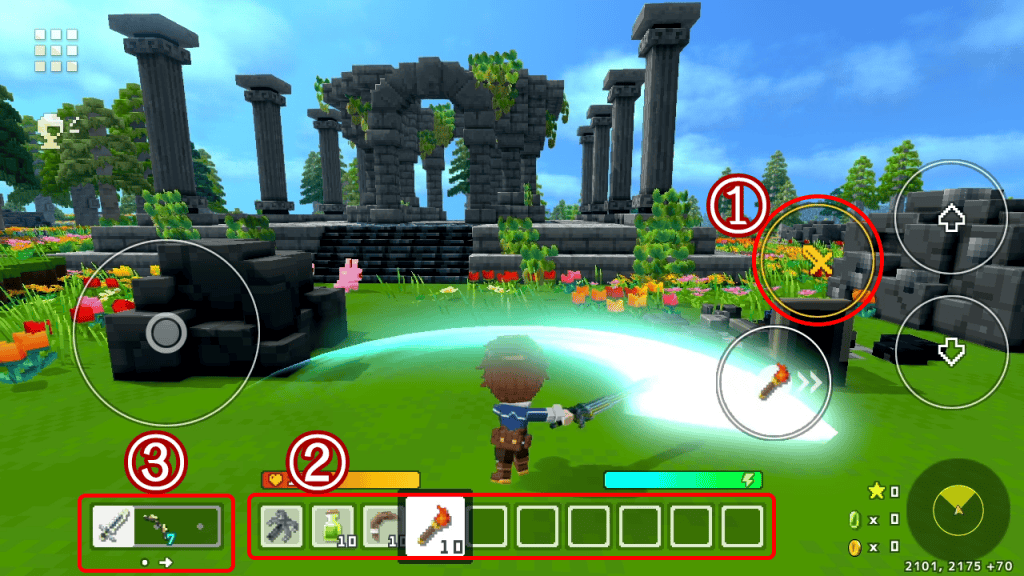
| Number | Explaination |
| ①: Attack |
Attack using the equipped weapon. |
| ②: Equipping a Weapon |
Tap to equip the desired weapon. |
| ④: Switch Equipment Tool |
Tapping will switch the equipped tool. |
Build Mode Controls
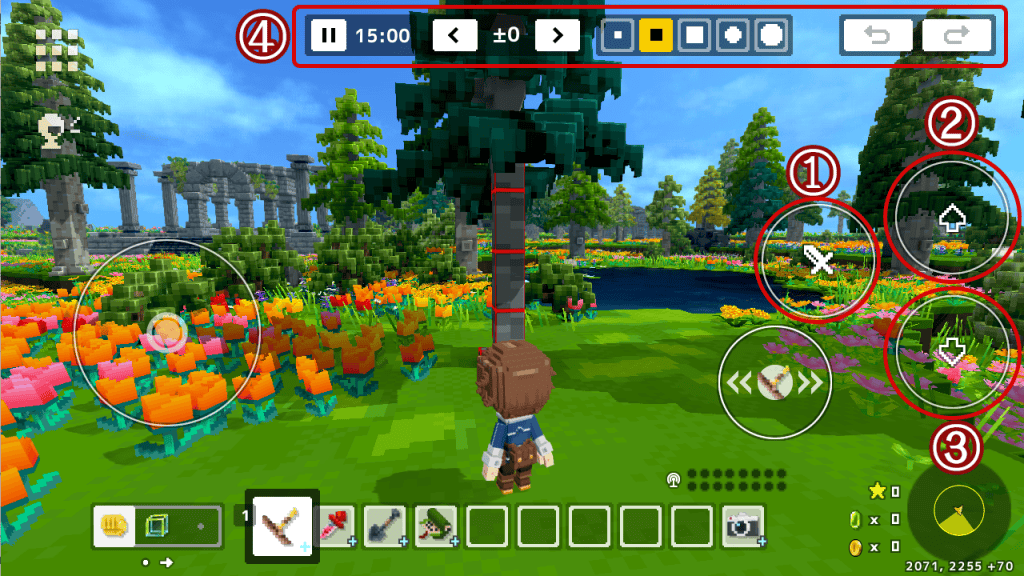
| Number | Explaination |
| ①: Destroy Blocks |
Destroy Blocks (while in Builder Select). |
| ②: Flight Mode |
Tap twice to switch to Flight Mode. |
| ④: Ascend |
Tap during Flight Mode to ascend. |
| ⑤: Descend |
Tapping while in Flight Mode to descend. |
| ⑥: Switch to Cursor Mode |
Tap to use the Builder Menu. |
Controls while Riding Vehicles or Animals
| Number | Explaination |
| ①: Get On / Get Off |
Tap the vehicle. |
| ②: Move |
When moving forward the vehicle will also move. |
| ③: Drift (while riding a Vehicle) |
Tap to jump, and hold to drift. |
| ⑥: Wheelie (while riding a Bike) |
Tap to do a Wheelie/td> |
“
Controls
Basic Controls
| Functions | Mouse/Keyboard |
| Move | Left Stick |
| Jump | X Button |
| Dash | Push in Left Stick |
| Climb | While jumping, face the wall and pressleft stick |
| Examine | A Button |
| Discard | ↓ Button |
| Select Item | LB / RB Button |
| Use Item | B Button |
| Item Shortcut | 【None】 |
| Display Menu | + Button |
| Cancel/Close | A Button |
| Chat | ↑ Button |
| Screenshot | 【None】 |
| Full Screen | 【None】 |
In-Game Controls
| Functions | Mouse/Keyboard |
| Attack | B Button |
| Equip Weapon | B Button |
| Change Weapon | A Button |
Build Mode Controls
| Functions | Mouse/Keyboard |
| Destroy Block (Builder Punch Selected) | B Button |
| Switch to Flying Mode | X Button (during jump) |
| Ascend | X Button (during fly) |
| Fall | Push in right stick (during fly) |
| Change Cursor Mode | A Button |
| Toggle Equiped Tool | A Button |
| Display Shortcut | 【None】 |
Controls When Riding Animals and Vehicles
| Functions | Mouse/Keyboard |
| Get On/Get Off | A Button | Move |
| Jump | X Button |
| Wheelie (When Riding a Bike) | Push Left Stick Down |
| Drift (When Riding a Vehicle) | Hold downand move left/right |
Controls
Basic Controls
| Functions | Mouse/Keyboard |
| Move | Left Stick |
| Jump | △ Button |
| Dash | L3 Button |
| Climb | While jumping, face the wall and pressleft stick |
| Examine | X Button |
| Discard | Down Button |
| Select Item | R1/L1 Button |
| Use Item | ◯ Button |
| Item Shortcut | 【None】 |
| Display Menu | TouchPadButton |
| Cancel/Close | ◯ Button |
| Chat | Up Button |
| Screenshot | 【None】 |
| Full Screen | 【None】 |
In-Game Controls
| Functions | Mouse/Keyboard |
| Attack | □ Button |
| Equip Weapon | ◯ Button |
| Change Weapon | R2 Button |
Build Mode Controls
| Functions | Mouse/Keyboard |
| Destroy Block (Builder Punch Selected) | □ Button |
| Switch to Flying Mode | △ Button (during jump) |
| Ascend | △ Button (during fly) |
| Fall | R3 Button (during fly) |
| Change Cursor Mode | X Button |
| Toggle Equiped Tool | R2 Button |
| Display Shortcut | 【None】 |
Controls When Riding Animals and Vehicles
| Functions | Mouse/Keyboard |
| Get On/Get Off | X Button |
| Move | Hold down R2 Button while pushing Left Stick Go Back with L2 Button |
| Jump | △ Button |
| Wheelie (When Riding a Bike) | Push Left Stick Down |
| Drift (When Riding a Vehicle) | Hold down△ Button and move left/right |