

How To Install
How to Install
PC Version
Download the installer from https://tera-1855e.web.app/download_early.html
Double-click the downloaded installer to launch.
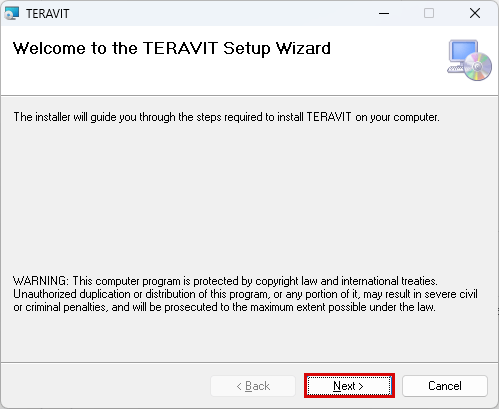
①Click on the area circled in red.
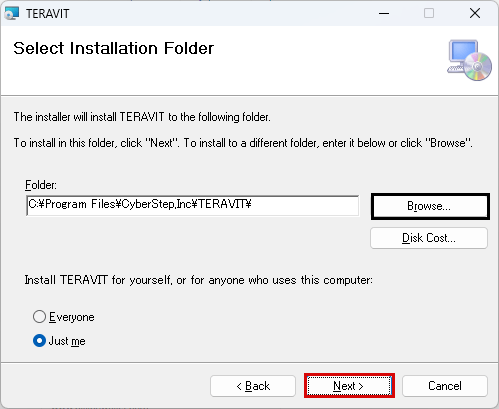
②Click the area circled in black to choose the location for installation. Click the area circled in red to proceed.
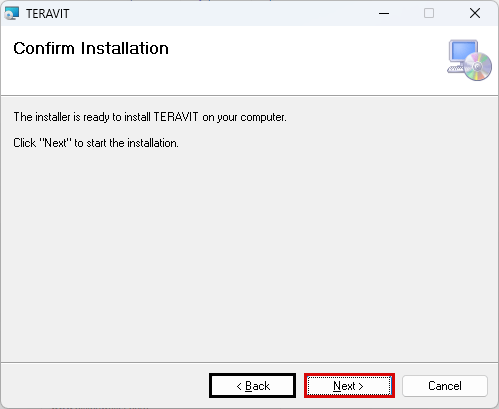
③A confirmation screen will appear. If there is no change needed, click the area circled in red to start installation. To go back to the page before, click the area circled in black.
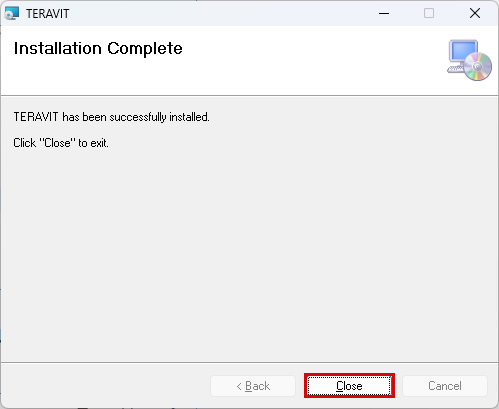
④Close the installer by clicking the area circled in red. The installation is now complete.
Double-clicking the Tervit icon will launch the game.
Account Registration for PC Version
①The login screen will appear when you first launch Teravit.
②Choose a login method from ‘New Registration’.
③You will receive an authentication email if you have registered your email address. Please follow the instructions to proceed with the verification.
④The login process is finished once authentication is complete.
Steam Version
1. Search for “Teravit” on the Steam store.
2. Select “Play Game”, confirm the install location, and then choose “Install”.
3. Selecting “Play” will launch Teravit.
How to Install
PC Version
Download the installer from https://tera-1855e.web.app/download_early.html
Double-click the downloaded installer to launch.
①Click on the area circled in red.
②Click the area circled in black to choose the location for installation. Click the area circled in red to proceed.
③A confirmation screen will appear. If there is no change needed, click the area circled in red to start installation. To go back to the page before, click the area circled in black.
④Close the installer by clicking the area circled in red. The installation is now complete.
Double-clicking the Tervit icon will launch the game.
Account Registration for PC Version
①The login screen will appear when you first launch Teravit.
②Choose a login method from ‘New Registration’.
③You will receive an authentication email if you have registered your email address. Please follow the instructions to proceed with the verification.
④The login process is finished once authentication is complete.
Steam Version
1. Search for “Teravit” on the Steam store.
2. Select “Play Game”, confirm the install location, and then choose “Install”.
3. Selecting “Play” will launch Teravit.
How to Install
iOS Version
1. Search for ‘Teravit’ on the Apple Store.
2. Select ‘Install’.
3. Tap the added icon on the home screen to launch Teravit.
Android Version
1. Search for ‘Teravit’ on the Google Play Store.
2. Select ‘Install’.
3. Tap the added icon on the home screen to launch Teravit.
How to Install
1. Search for ‘Teravit’ on the Nintendo e Shop.
2. Select ‘Add to Cart’.
3. Select ‘Checkout’.
3. Download will start automatically once the game has been purchased.
How to Install
1. Search for “Teravit” on the PlayStation Store.
2. Select “Teravit” and choose “Add to Cart”.
3. Select “Add to Cart” and complete the purchase process.
3. Select “Download” to transition to the download screen.